
Bridge 3CX into LeadConnector: Connect Zero for 3CX
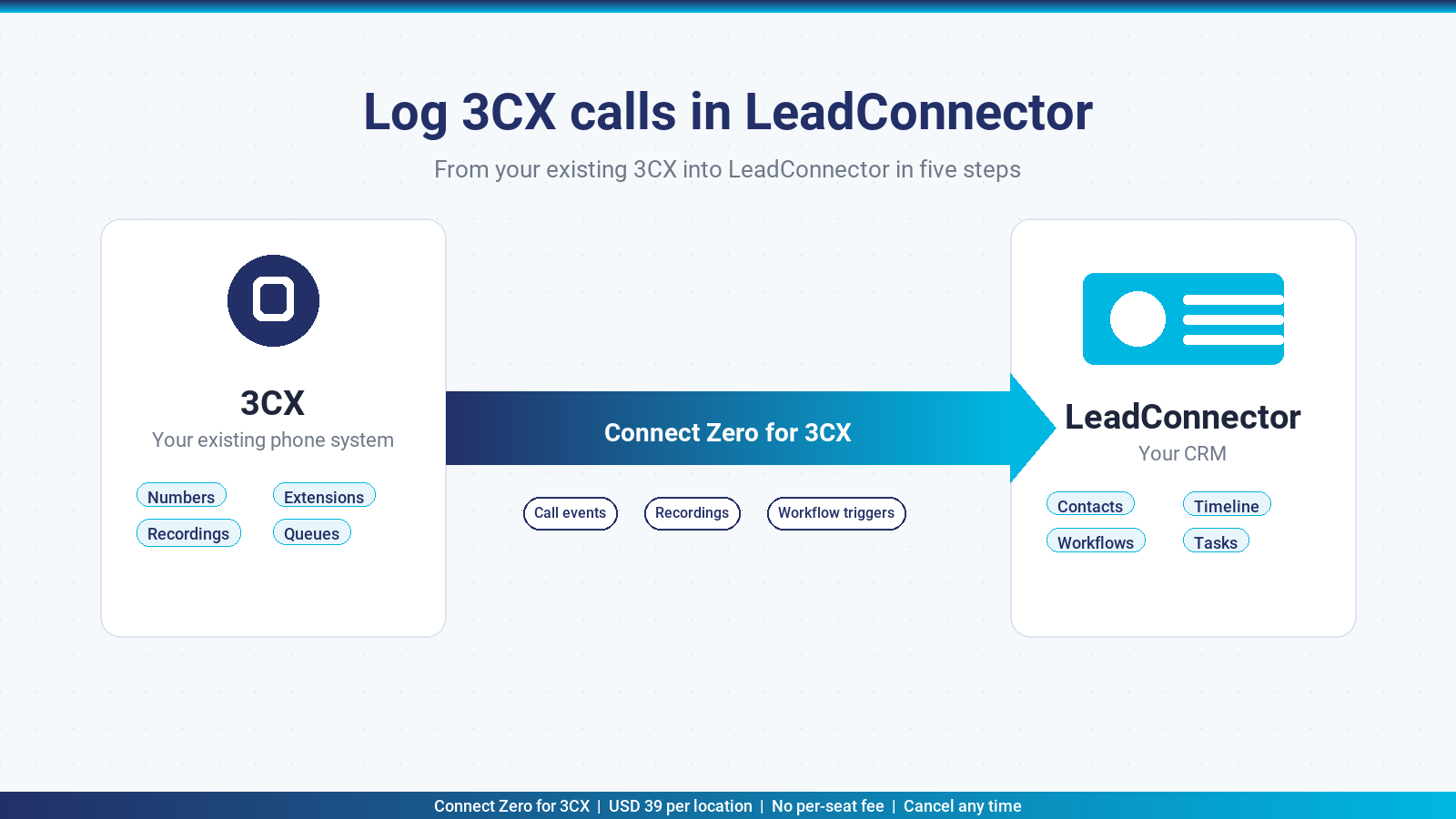
LeadConnector is the white-labelled CRM that HighLevel-built agencies resell to their end clients. If your agency runs LeadConnector for the contact database and Conversations inbox, and your phones run on 3CX, Connect Zero for 3CX is the marketplace app that bridges the two. This page walks through what the integration delivers, how to install it in five steps, the alternatives and trade-offs, and the pricing.
TL;DR: Connect Zero for 3CX bridges your existing 3CX system into LeadConnector. Install from the marketplace, paste in a 3CX address and an API user, map extensions to LeadConnector users, and your inbound and outbound 3CX calls flow into LeadConnector as Conversation messages with recordings attached and workflow triggers ready to fire. USD 39 per location per month flat, no per-seat fee, cancel any time.
What the 3CX LeadConnector integration does
Connect Zero for 3CX is a two-surface integration into LeadConnector. The first surface is the LeadConnector Conversations inbox, where every inbound and outbound 3CX call shows up as a Conversation message with the contact match, call direction, duration and recording link inline. Your team replies to leads in the same inbox they use for SMS, email and webchat, with phone calls now visible there too.
The second surface is the LeadConnector workflow engine. Connect Zero for 3CX fires workflow triggers on call events: missed call from a known contact, first call from a new number, call from a contact in a specific tag, and so on. Whatever automation you have configured in LeadConnector against those triggers kicks off the moment 3CX reports the call ended.
The bridge is one-way for call data. Your 3CX configuration stays untouched. Connect Zero for 3CX reads call events from the 3CX Call Control API and writes them into LeadConnector via the LeadConnector API. The recording itself stays in 3CX storage; LeadConnector holds the playable link.
If your agency has multiple sub-accounts under one LeadConnector parent, the bridge installs per sub-account. Each sub-account is one “location” in the marketplace pricing model. The 3CX side can be a single shared system with per-extension mapping to per-sub-account users, or one 3CX system per sub-account.
Who this integration suits
Connect Zero for 3CX fits LeadConnector agencies that already run 3CX and want to keep it. The integration is a bridge, not a replacement. It does not provide PBX features because 3CX already provides those.
In practice, four agency profiles get the cleanest fit:
- LeadConnector resellers whose end clients use 3CX as the incumbent phone system
- Sales teams that adopted LeadConnector for the CRM and workflow engine on top of an existing 3CX deployment
- Multi-location operators with a single 3CX system shared across LeadConnector sub-accounts
- Australian agencies that want an Australian-built bridge and Australian-hours support
Install in five steps
The install path is short. Five steps, about two minutes from start to first call event in LeadConnector.
- Open the LeadConnector marketplace, search “Connect Zero for 3CX” and click Install. Choose the sub-account you want the bridge to write into.
- Paste your 3CX address and 3CX API user credentials. The Connect Zero setup wizard checks the connection and lists your extensions.
- Map your 3CX extensions to LeadConnector users. The wizard guesses by email match first and lets you adjust before saving.
- Confirm the marketplace pricing acceptance. The bridge starts on the USD 39 standard plan with the two meters listed.
- Activate the connector. Call events start flowing into LeadConnector within seconds of the next 3CX call.
The bridge runs entirely on the Connect Zero infrastructure. Your 3CX system reaches the bridge over HTTPS. LeadConnector reaches the bridge over the LeadConnector marketplace OAuth handshake. No on-premises components on either side.
Connect Zero for 3CX vs the alternatives
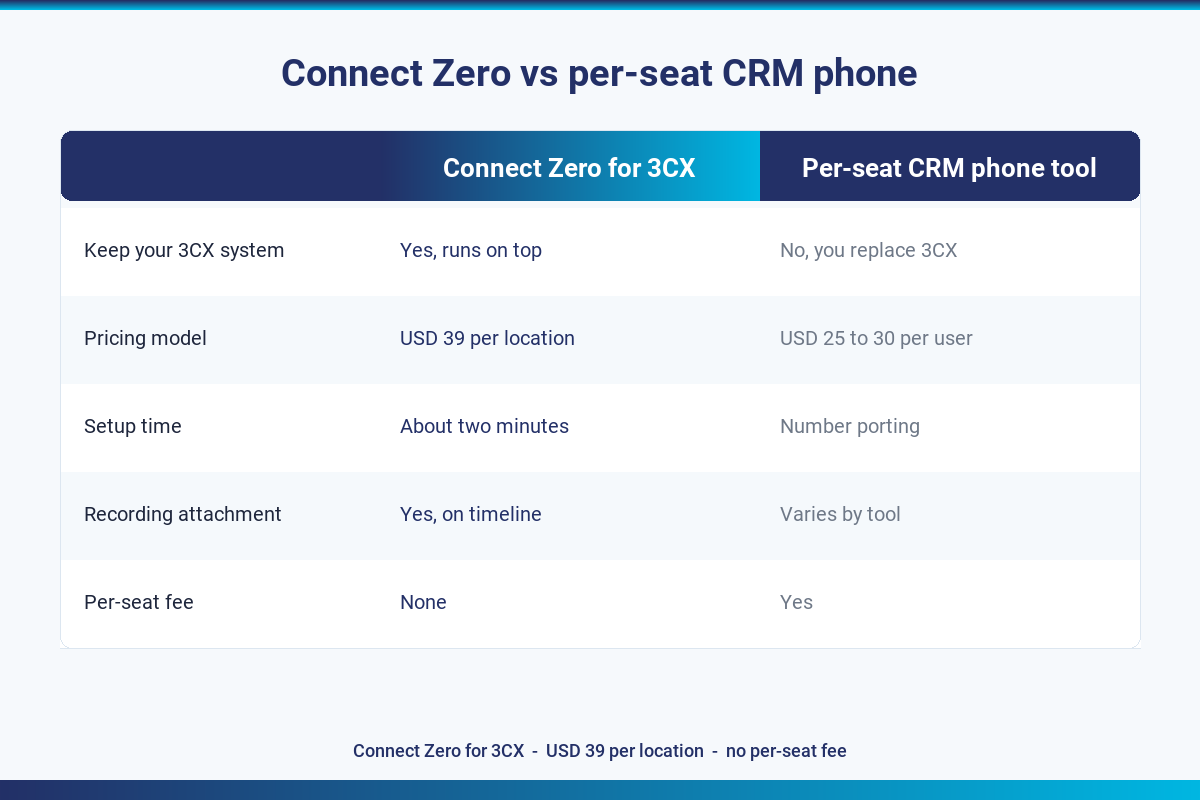
The two patterns competing for the same job are Connect Zero for 3CX (bridge your incumbent 3CX into LeadConnector) versus a per-seat CRM phone tool (replace 3CX with a softphone that ships with LeadConnector). The table below sets them side by side.
| Connect Zero for 3CX (keep 3CX) | Per-seat CRM phone tool | |
|---|---|---|
| Keep your existing 3CX system | Yes, runs on top | No, you replace 3CX |
| Pricing model | Flat USD 39 per location, per month | Per user, per month, typically USD 25 to 30 |
| Setup time | About two minutes from the marketplace | Number porting + soft-phone rollout |
| Recording attachment in LeadConnector | Yes, on the contact timeline | Varies by tool |
| Missed-call workflow trigger | Yes, native | Yes, native |
| Per-seat fee | None | Yes |
| Real-time sync | Yes, sub-second from 3CX call end | Yes |
Who Connect Zero for 3CX suits
Agencies that already have 3CX numbers, extensions, queues and recordings configured. Teams that want flat per-location pricing rather than per-seat pricing. Operators that want to cancel by uninstalling from the marketplace rather than navigate a contract exit.
Who a per-seat CRM phone tool suits
Agencies starting fresh with no incumbent phone system. Teams that prefer a single-vendor relationship covering both phones and CRM. Operators with a small fixed seat count who do not expect to grow the team.
Pricing
Connect Zero for 3CX uses a flat-rate plus metered pricing model. The base is USD 39 per LeadConnector sub-account per month. Inbound call sync is metered at USD 0.02 per message synced. Workflow triggers are metered at USD 0.01 per trigger fired.
For a typical sub-account doing 3,300 inbound calls per month and 200 workflow triggers, the monthly cost lands at around USD 107. There is no per-seat fee, so adding or removing 3CX extensions or LeadConnector users does not change the bill. No setup fee, no minimum term.
The full pricing context with the worked example lives on Connect Zero pricing.
Trust signals
- USD 39 per location per month, no per-seat fee
- Cancel any time by uninstalling from the marketplace
- Australian-built, Australian-hours support from Adelaide
- Free trial on your existing 3CX setup, no credit card required to start
- Works with any 3CX hosting (self-hosted, 3CX cloud, partner-hosted)
Frequently asked questions
Which LeadConnector pricing tier do I need to use this integration?
Any LeadConnector sub-account that has the Conversations module enabled can install Connect Zero for 3CX. This covers every published LeadConnector plan, so there is no upper-tier dependency.
Is there a free trial?
Yes. The trial runs on your existing 3CX setup with no credit card required to start. You get enough time to see real call events flowing into LeadConnector before any meter charge runs.
Does Connect Zero for 3CX support multiple LeadConnector sub-accounts?
Yes. Each sub-account installs the app separately and is billed as one location. The 3CX side can be a single shared system with per-extension mapping, or a separate 3CX system per sub-account.
Will my call recordings show up in LeadConnector?
Yes. 3CX recordings are attached to the matching contact’s LeadConnector timeline as a playable link. The recording stays in 3CX storage and LeadConnector holds the link.
Does the missed-call workflow trigger fire reliably?
Yes. The trigger fires the moment 3CX reports the call as ended with no answer. From there your LeadConnector workflow takes over with whatever sequence you have configured.
What happens if I am switching from a per-seat CRM phone tool?
You install Connect Zero for 3CX on top of your existing 3CX system, run both in parallel for a week, then turn off the per-seat tool once you are comfortable with the flow. No PBX cutover, no number porting, no team retraining.
Does this work for whitelabel agencies?
Yes. The bridge runs inside the whitelabelled LeadConnector interface. Your end clients see your branded CRM. Connect Zero for 3CX is the underlying integration provider visible only on the install screen and the meter line item.
Ready to log 3CX calls in LeadConnector?
Three ways to start.
- Start a free trial of Connect Zero for 3CX from the LeadConnector marketplace. No credit card required to install.
- Book a demo to see calls flowing into a sample LeadConnector sub-account from a sample 3CX dataset.
- Talk to sales if you have a multi-location agency and want help mapping 3CX extensions across sub-accounts.
Two related comparisons worth a read before you decide: the Aircall-to-CRM comparison and the JustCall-to-CRM comparison cover the cost shape if you are weighing a PBX replacement rather than a bridge.
Last updated 2026-05-24 by the Connect Zero team. Adelaide, South Australia. Questions about your specific 3CX setup? Use the contact page or email hello@connectzero.com.au.
