
Troubleshooting 3CX call recordings not appearing in your CRM
When 3CX call recordings stop appearing on the matching CRM contact, the cause is almost always one of seven things: the 3CX licence does not cover recording, the API user is missing a role, the extension is not flagged to record, the bridge fired before 3CX finished writing the file, the contact phone number did not match, the recording was deleted by retention policy, or the 3CX address is unreachable on the network. Work through them in that order; the cheaper checks are first by design.
The diagnostic order in one paragraph
The order matters because two of the seven causes account for more than half of every "where is my recording?" ticket Connect Zero handles. Licence and role come first because they are free to check and fix, and they fail silently with no error message in the CRM. Late-recording timing comes next because it is the single most common technical failure: the recording does indeed exist on 3CX, the bridge just looked too early. Contact match, retention and network are last because they are rare and the fix is more involved.
According to the 3CX rights for recordings documentation, a user must hold the Recording Manager rights group to retrieve recordings via the API, separate from the right to read call history (3CX documentation, accessed 24 May 2026). That single split is the root cause of more "no recording" tickets than every other cause combined.
Cause 1: 3CX licence does not include call recording
Call recording is not enabled on every 3CX licence tier. The lower tiers do not include it, even if your PBX is happy to call out and receive. On the Hosted by 3CX plans, recording is available on the upper tiers; on self-managed PBX deployments, the licence file must include the recording entitlement. The 3CX call recording documentation lists the licence requirements (3CX documentation, accessed 24 May 2026).
The diagnostic check is simple. Sign into the 3CX admin console, open System, Licence. Confirm the licence text mentions call recording and the number of simultaneous recording channels is greater than zero. If recording is not in the licence, no API permission, no bridge change, and no CRM setting will produce a recording, because the PBX is not writing the file.
Cause 2: API user is missing the Recording Manager role
This is the single most common failure. The 3CX API splits "read call history" and "fetch recordings" into separate rights groups. An API user with Reports User rights returns the call list but a 401 or 403 on the recording URL.
The fix is in the 3CX admin console. Open Users, edit the API user (the dedicated crm-bridge user, not your personal admin account), assign both the Recording Manager and Reports User rights groups, save, and trigger the bridge to retry the call. The 3CX access roles documentation lists the available roles and how they map to API surface area (3CX documentation, accessed 24 May 2026).
A diagnostic shortcut: if the call appears in the CRM with metadata (number, duration, direction) but no recording, the API user can read call history and cannot read recordings. Role 1 of 2 is assigned, role 2 of 2 is not.
Cause 3: Extension or inbound rule is not flagged to record
If a single extension records reliably and another one does not, the issue is at the extension or inbound-rule level, not the bridge. Open Extensions, choose the user, open Options. Recording can be set to "All Calls", "On Demand" or "Disabled". Inbound rules can also override the extension setting.
Test by placing a recorded call directly from the extension. If the recording appears in the 3CX call history under that extension within two minutes, the PBX is recording correctly and the bridge should pick it up on the next call attempt. If it does not appear in the 3CX call history, recording is disabled for that extension or inbound rule and no bridge will recover it.
Cause 4: The bridge fired before 3CX finished writing the recording file
This is the most common technical cause and the one DIY builds always miss. 3CX writes the recording file after the call ends, not while the call is in progress. The file appears on the PBX a few seconds to roughly a minute after hang-up, longer on busy systems and on hosted PBXes during peak hours.
A naive bridge posts the call event the moment the call ends, asks for the recording URL, gets a 404, and never tries again. The result is a CRM contact event with no recording attached, even though the recording lands on the PBX 30 seconds later.
The fix is a retry loop. The bridge posts the call event with a placeholder, then polls the 3CX recording endpoint with exponential backoff for up to two minutes, then patches the contact event with the URL when the file appears.
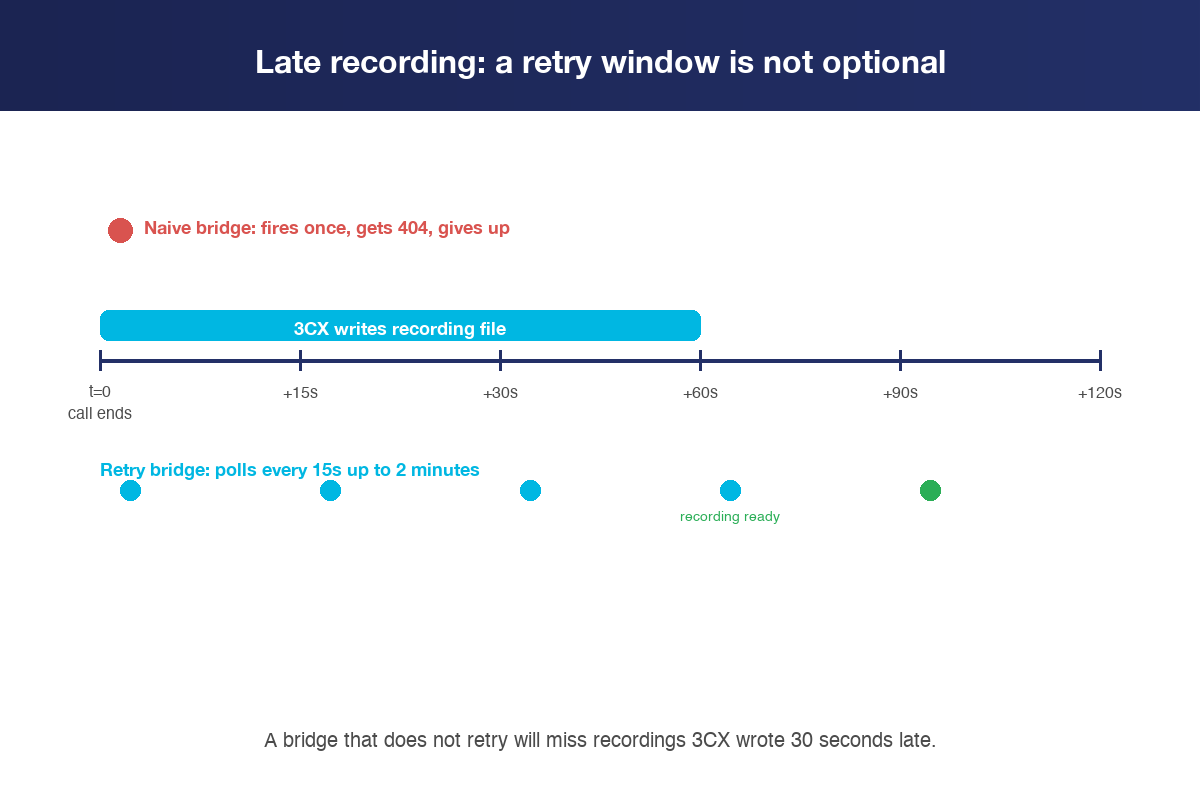
If you are using the Connect Zero for 3CX-to-CRM bridge, the retry loop is built in and runs for up to two minutes per call by default. If you are building your own, this is the single highest-leverage change you can make.
Cause 5: Contact phone number did not match in the CRM
The bridge needs to know which CRM contact to attach the call event to. The match is by phone number, normalised to E.164 (international, plus-prefixed). If the contact phone number is stored in a local format the bridge cannot normalise, the contact does not match, the call event lands on a default or orphan record, and the recording sits underneath nothing useful.
Three symptoms point at this cause. Calls appear under a single "default" contact rather than the right one. Calls appear under a contact created by the bridge with only a phone number and no other fields. Recordings exist on 3CX but are not visible on any contact at all in the CRM.
The fix is to normalise the contact phone numbers in the CRM to E.164. For Australian numbers that means +61 prefix, no leading zero. For United States numbers, +1. For United Kingdom, +44. Bulk-update existing contacts via the CRM's import or API. Run a test call from a known E.164-formatted contact and confirm the call appears under that contact, not under a default record.
Cause 6: Retention policy deleted the recording before the bridge fetched it
If recordings were syncing for weeks and then disappeared, retention is the likely cause. 3CX retention policies delete recordings after a configured number of days. If a customer asks for a recording from six months ago and you set retention to 90 days, the file is gone from the PBX and the CRM link returns a 404, even though the CRM event still shows a clickable link.
Open 3CX, System, Settings, Storage. Read the retention number. Compare it to the age of the recording the customer wants. The 3CX call recording documentation explains the retention controls (3CX documentation, accessed 24 May 2026).
The fix is to align retention to your compliance posture. The PBX is the system of record for audio, and when the PBX deletes the recording, the CRM link breaks cleanly. If your jurisdiction requires longer retention, increase the number on 3CX, not in the CRM. Storing a second copy on the CRM side defeats the recording-stays-on-PBX model that keeps your storage cost down.
Cause 7: 3CX API is unreachable or the bearer token is wrong
A bridge that suddenly stops working across every call points at a connectivity or authentication issue, not at any single call. Most often the cause is a 3CX upgrade that rotated the API key, a firewall change that blocks the bridge's outbound IP, or an SSL certificate that expired and renewed with a slightly different chain.
The diagnostic check uses any HTTPS client (Postman, curl, the bridge's own diagnostic page). From the bridge's network, hit the 3CX API base URL with the bearer token. Expect a 200 with a JSON body listing extensions or calls. A 401 means the token is wrong or expired. A connection refused means the network or DNS is blocking the bridge.
The fix path depends on the error. Rotate the 3CX API key under Users, edit the API user, regenerate. Update the bridge configuration with the new key. For a network or firewall block, whitelist the bridge's outbound IP at the 3CX network edge and at any intermediate firewalls.
Step-by-step: work the seven causes in order
Use this exact order. The cheapest checks come first, the rare ones last.
- Check the 3CX licence. System, Licence. Confirm call recording is included and at least one recording channel is licensed.
- Check the API user roles. Users, edit the API user. Confirm Recording Manager and Reports User rights groups are both assigned.
- Check extension recording flag. Extensions, the user in question, Options. Confirm recording is set to All Calls or On Demand. Place a test call and confirm it appears in the 3CX call history within two minutes.
- Check the bridge retry window. If your bridge does not retry for at least two minutes after the call ends, recordings written late will be missed. Connect Zero retries by default; check the docs for any other bridge.
- Check contact phone number normalisation. Confirm the contact you expect the call to land on is stored in E.164 format. Place a test call from a known-good contact and confirm it attaches there.
- Check the 3CX retention policy. System, Settings, Storage. Confirm the retention window is longer than the oldest recording you expect to be able to view from the CRM.
- Check API reachability and authentication. From the bridge network, hit the 3CX API base URL with the bearer token. Confirm a 200 response on a simple list call. If 401, rotate the key. If timeout, whitelist the bridge IP.
If all seven check clean and recordings still do not appear, contact the team. At that point the issue is rarely on 3CX or the CRM in isolation; the bridge logs are where the answer lives.
What we look at first when we get a ticket
Three things, in order, before anything else.
- The most recent recorded call on the PBX, by extension. If it is on 3CX, the PBX is recording. If it is not, the cause is cause 1, 2, or 3.
- The CRM event for that same call. If the event is there with metadata but no recording, the bridge ran but the recording was missing at fetch time. Cause 4 (late) or cause 6 (retention).
- The bridge logs for that call ID. If the logs show a 401 on the recording endpoint, role is missing (cause 2). If they show a 404, late or retention (cause 4 or 6). If they show no retry attempts, the bridge gave up too early (cause 4).
The full architecture of how Connect Zero handles this is on how the bridge works, including the late-recording retry loop and the streaming model.
Frequently asked questions
Why does the call appear in my CRM but the recording link is missing?
The bridge posted the call event before 3CX finished writing the recording file, and it did not retry. 3CX writes the recording file a few seconds to roughly a minute after the call ends, longer on busy hosted PBXes. A correctly built bridge polls the 3CX recording endpoint for up to two minutes after the call ends and patches the contact event with the URL when the file is ready.
Can I get historical recordings into the CRM after install?
No, only calls placed after install sync automatically. Bulk historical import is a sales-assisted conversation, not a default behaviour. If you need historical recordings on existing contacts, ask the team via contact and we will scope it.
My recording link returns a 404 in the CRM. Why?
Most likely the recording was deleted by the 3CX retention policy. Open 3CX, System, Settings, Storage and read the retention number. If the recording is older than the retention window, the file is gone from the PBX and the CRM link is dead. The fix is to align the retention window to your compliance requirement, not to copy the recordings to the CRM side.
I rotated my 3CX API key and now no recordings sync. What happened?
The bridge is still using the old key. Update the bridge configuration with the new key under whatever credential-management surface the bridge uses (in Connect Zero, the 3CX settings page in the app). After the update the next call should sync correctly.
Recordings work for some extensions and not others. Why?
Recording is set per extension or per inbound rule on 3CX. Open Extensions, the affected user, Options. Confirm recording is set to All Calls or On Demand. The bridge can only fetch a recording that the PBX wrote, and the PBX only writes when the flag is on.
Does the bridge copy recordings off the PBX?
No. Connect Zero streams the recording URL into the CRM contact event but does not copy or store the audio on its own infrastructure. The audio plays back from 3CX through the customer's existing 3CX licence. The PBX stays the system of record for audio; if you delete the recording on the PBX, the CRM link returns a 404.
What do I need on 3CX to make recordings work in the CRM?
A 3CX licence that includes call recording, recording enabled at the extension or inbound rule level, and a dedicated API user with both the Recording Manager and Reports User rights groups. The bridge handles everything from there. The detail is in our companion guide on 3CX licence requirements for CRM integration.
How long should I wait before assuming a recording is missing?
Two minutes after hang-up. Within that window, even a correctly built bridge is still polling 3CX for the recording file. If the recording does not appear within two minutes, work through the seven causes in order. Most of the time the answer is in causes 1 through 4.
Connect Zero is built by Auswide IT, an Australian 3CX VAR partner and MSP integration vendor based in Adelaide. Last updated 24 May 2026.
See Connect Zero.
The 3CX-to-CRM bridge. Recordings, missed calls, workflows.
