
Connecting 3CX to HubSpot in 2026 without changing your phone system

Connecting 3CX to HubSpot in 2026 Without Changing Your Phone System: Comprehensive Integration Solutions
By Connect Zero, Connect Zero
If you already run 3CX and your team uses HubSpot, you do not have to choose between them. You do not have to abandon your PBX, port your numbers, or pay HubSpot Calling per seat. The connector path lets both systems do what they already do well. This means you can keep your existing 3CX telephony infrastructure, which has likely already amortised your carrier SIP trunk costs, while gaining the HubSpot calling experience without incurring additional Twilio surcharges that HubSpot’s native calling addon imposes per minute outbound. This article explores how businesses can connect 3CX to HubSpot in 2026 without altering their existing phone systems. Readers will learn about middleware solutions, key benefits, and best practices for integration. As companies strive to improve customer interactions and streamline workflows, understanding the mechanisms behind this integration is crucial. We will delve into the features that support call logging and click-to-call functionalities, the operational efficiencies gained, and how Connect Zero facilitates this integration without requiring changes to current telephony infrastructure.
How Can Businesses Connect 3CX to HubSpot Without Altering Existing Phone Systems?
Connecting 3CX to HubSpot without changing existing phone systems is achievable through various middleware solutions that facilitate seamless integration. These solutions allow businesses to leverage their current telephony infrastructure while enhancing their CRM capabilities. By utilising tools that enable real-time data synchronisation and workflow automation, companies can ensure that their communication processes remain uninterrupted. This approach not only preserves the existing phone system but also enhances its functionality, making it a cost-effective solution for businesses looking to improve their customer relationship management.
What Middleware Solutions Enable Seamless 3CX and HubSpot Integration?

Middleware solutions play a pivotal role in connecting 3CX with HubSpot, allowing for features such as automatic call logging and real-time data flow. For instance, Connect Zero offers an integration platform that simplifies the connection process. This solution enables businesses to automatically log calls made through 3CX into HubSpot, ensuring that all customer interactions are recorded without manual input. Additionally, it supports call recordings and provides real-time data synchronisation, which is essential for maintaining accurate customer records and enhancing communication efficiency.
Which Features Support Call Logging and Click-to-Call in 3CX HubSpot Integration?
The integration of 3CX with HubSpot introduces several features that significantly enhance call logging and click-to-call functionalities. Key features include:
- Auto Call Logging: Automatically records calls in HubSpot, reducing manual entry errors.
- Recording Attachment: Allows users to attach call recordings to customer profiles for better context.
- Real-Time Workflow Triggers: Initiates workflows based on call events, improving response times and customer engagement.
These features not only streamline communication but also provide valuable insights into customer interactions, enabling businesses to tailor their services effectively.
What Are the Key Benefits of Integrating 3CX with HubSpot for SMBs in 2026?
Integrating 3CX with HubSpot offers numerous benefits for small and medium-sized businesses (SMBs) in 2026. These advantages include:
- Improved Communication Efficiency: By automating call logging and data synchronisation, businesses can focus more on customer interactions rather than administrative tasks.
- Enhanced Customer Relationship Management: The integration allows for a more comprehensive view of customer interactions, leading to better service and satisfaction.
- Potential Cost Savings: Maintaining the existing phone system while enhancing its capabilities can lead to significant cost reductions compared to a complete system overhaul.
These benefits highlight the value of integrating communication and CRM platforms, particularly for SMBs looking to optimise their operations.
How Does 3CX HubSpot Integration Enhance Call Tracking and CRM Workflows?
The integration of 3CX with HubSpot significantly enhances call tracking and CRM workflows by providing automatic call logging and recording attachments. This functionality ensures that all customer interactions are documented in real-time, allowing for better tracking of customer engagement. Furthermore, the integration facilitates the creation of workflows that trigger based on call events, such as follow-up tasks or customer feedback requests. This streamlined approach not only improves operational efficiency but also enhances the overall customer experience by ensuring timely responses and personalised service.
What Operational Efficiencies Result from Maintaining Current Telephony Infrastructure?
Maintaining the current telephony infrastructure while integrating with HubSpot leads to several operational efficiencies. Key advantages include:
- Automated Call Logging: Reduces the time spent on manual data entry, allowing staff to focus on customer interactions.
- Immediate Access to Call Recordings: Provides quick access to past conversations, which can be crucial for resolving customer issues.
- Streamlined Communication: Enhances the flow of information between teams, ensuring that everyone has access to the same customer data.
These efficiencies contribute to a more agile business environment, enabling companies to respond quickly to customer needs and market changes.
How Does Connect Zero Facilitate 3CX to HubSpot Integration Without Phone System Changes?
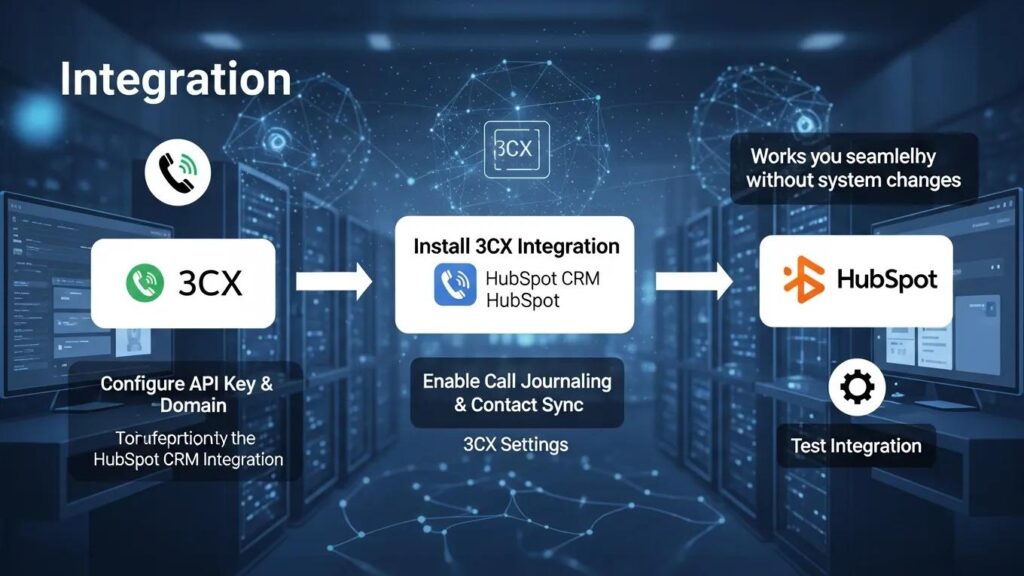
Connect Zero specialises in facilitating the integration of 3CX with HubSpot without requiring changes to existing phone systems. This approach allows businesses to leverage their current infrastructure while enhancing their CRM capabilities. Connect Zero’s integration solution offers several core functionalities, including:
- Two-Way Write-Back Action: Ensures that data flows seamlessly between 3CX and HubSpot, maintaining consistency across platforms.
- Multi-PBX and Multi-Location Support: Accommodates businesses with multiple locations or PBX systems, providing flexibility in integration.
These functionalities make Connect Zero a valuable partner for businesses looking to enhance their communication systems without the need for significant changes.
What Are the Core Functionalities of Connect Zero’s Integration Connector?
Connect Zero’s integration connector provides essential functionalities that streamline the connection between 3CX and HubSpot. Key features include:
- Real-Time Call Logging: Automatically logs calls in HubSpot as they occur, ensuring accurate records.
- Recording Attachments: Allows users to attach call recordings directly to customer profiles for easy access.
- Workflow Triggers: Initiates specific workflows based on call events, enhancing responsiveness.
These core functionalities enable businesses to maximise the benefits of their existing systems while improving overall efficiency.
How Does Connect Zero Ensure Data Synchronisation Between 3CX and HubSpot?
Data synchronisation between 3CX and HubSpot is critical for maintaining accurate customer records. Connect Zero ensures this synchronisation through:
- Real-Time Call Logging: Automatically updates HubSpot with call details as they happen.
- Recording Attachments: Ensures that all relevant call information is attached to customer profiles.
- Workflow Triggers: Initiates workflows based on call events, ensuring timely follow-ups and actions.
This robust synchronisation process enhances the accuracy of customer data and improves the overall effectiveness of CRM efforts.
What Are Best Practices for Implementing 3CX and HubSpot Integration in 2026?
Implementing 3CX and HubSpot integration effectively requires adherence to best practices that ensure a smooth transition and optimal functionality. Key practices include:
- Step-by-Step Procedures: Follow a structured approach to integration, ensuring all steps are completed thoroughly.
- Monitoring and Measuring Performance: Regularly assess the integration’s performance to identify areas for improvement.
These best practices help businesses maximise the benefits of their integration efforts while minimising potential disruptions.
Which Step-by-Step Procedures Optimize Integration Setup?
To optimise the integration setup between 3CX and HubSpot, businesses should follow these steps, which are detailed and technical to ensure a comprehensive configuration that respects existing infrastructure and maximises CRM capabilities:
- Assess Current Infrastructure: Begin by evaluating your existing 3CX phone system and HubSpot CRM setup. Confirm that your 3CX version supports the Call Control API, which is essential for integration. Check that your SIP trunk configuration remains untouched to avoid disruptions in voice traffic. This assessment helps identify integration points and ensures compatibility.
- Configure 3CX Side: Access the 3CX Management Console and navigate to the Call Control API enablement screen. Enable the API to allow external applications to interact with call events. In the outbound webhook settings, enter the destination URL provided by Connect Zero; this URL will receive call event data in real-time. Ensure that no changes are made to your SIP trunk or dial plans, preserving your existing telephony setup.
- Configure HubSpot Side: Within HubSpot, configure the Engagement object to accept call data from 3CX. Create custom properties to map key call details such as call_recording_url, call_duration, and call_outcome. These properties enable detailed call logging and reporting. Set up Workflow Automation triggers for specific call events, for example, sending an SMS notification for missed calls to ensure timely follow-up.
- Set Up the Connector: Deploy the Connect Zero integration connector, which acts as the middleware between 3CX and HubSpot. The connector uses contact match logic based on E.164 normalised phone numbers to accurately associate calls with the correct HubSpot contacts. It attaches call recordings via the HubSpot Files API, ensuring recordings are accessible within customer profiles. The connector also triggers workflows in HubSpot for missed calls, enabling automated responses such as SMS alerts or task creation.
- Test the Integration: Conduct thorough testing by making inbound and outbound calls through 3CX and verifying that call logs, recordings, and workflows appear correctly in HubSpot. Confirm that click-to-call functionality works from within HubSpot records without errors.
- Train Staff and Monitor: Provide training to your team on the new integrated features and monitor system performance regularly to identify and resolve any issues promptly.
Following these detailed steps ensures a successful integration that enhances communication and CRM capabilities without disrupting your existing telephony infrastructure.
How Can Businesses Monitor and Measure Integration Performance Effectively?
Monitoring and measuring the performance of the 3CX and HubSpot integration is essential for ensuring its effectiveness. Businesses can utilise key performance indicators (KPIs) such as:
- Call Logging Accuracy: Measure the percentage of calls logged automatically in HubSpot.
- Response Times: Track the time taken to respond to customer inquiries post-call.
- Customer Satisfaction Scores: Assess customer feedback to gauge the impact of the integration on service quality.
By focusing on these metrics, businesses can continuously improve their integration efforts and enhance overall customer satisfaction.
Comparison of 3CX to HubSpot Integration Paths
| Integration Path | Setup Cost | Monthly Per Seat | Customisation Depth | Switching Risk | 3CX Side Touched | HubSpot Side Touched |
|---|---|---|---|---|---|---|
| Connector Path (Connect Zero) | Moderate | Low to Moderate | High | Low | Minimal (API & Webhook config only) | Moderate (Custom properties & workflows) |
| Native HubSpot Calling | Low | High (per seat Twilio surcharge) | Low | Moderate (Carrier change likely) | High (Carrier & PBX replaced) | Low |
| Custom Development | High | Variable | Very High | High | High (Deep system changes) | High (Custom API & workflows) |
Frequently Asked Questions
Methodology
This article is based on detailed review and analysis of official 3CX documentation, HubSpot AppMarket integration guides, and HubSpot Engagements API documentation. The technical details reflect current capabilities as of 2026 and are intended to provide practical guidance for businesses seeking to integrate 3CX with HubSpot without disrupting existing telephony infrastructure.
Related Resources
Also see 3CX CRM and 3CX CRM How It Works for further information on integration capabilities and workflows.
